
From Script Sprawl to Scalable Automation: How One Credit Union Scaled Report Delivery from Fiserv to SharePoint
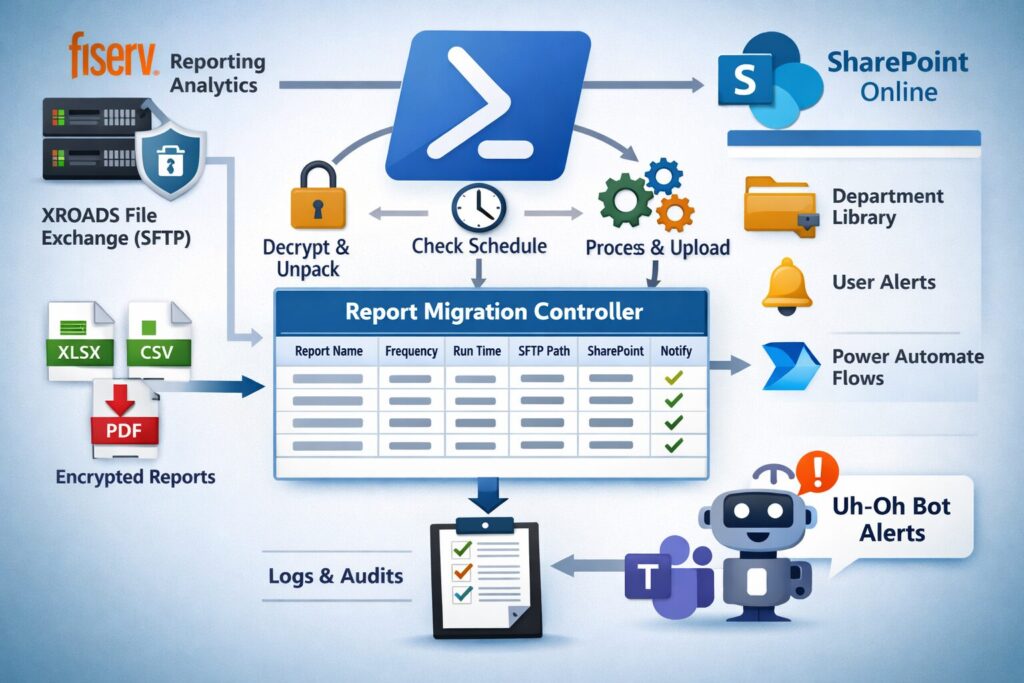
Credit unions rarely struggle with a lack of reports.
They struggle with getting the right reports to the right people, at the right time, in the systems where work actually happens.
For one credit union, that system was SharePoint Online.
Staff across every department were already working in SharePoint daily. It served as the institution’s central knowledge repository, collaboration platform, and operational workspace.
But critical reports were being generated in Fiserv’s Reporting Analytics platform, a version of IBM Cognos Analytics.
That created an operational disconnect.
Users who needed daily, weekly, and monthly reports had to sign into Reporting Analytics separately just to retrieve them. In many cases, the institution did not want broad staff access to the reporting platform at all.
The result was friction, unnecessary permissions complexity, and manual work.
Over time, that problem became an automation framework.
The Initial Need
The first request seemed straightforward.
One daily report needed to be delivered into a SharePoint document library after it ran.
Fiserv’s XROADS File Exchange could automatically send a copy of the report to an internal SFTP server each time the report executed.
That solved the outbound delivery piece.
From there, I wrote a PowerShell script that:
- retrieved the encrypted report file
- decrypted and unpacked it
- uploaded it to the correct SharePoint document library
The script ran once per day after the report was expected to arrive.
Problem solved.
At least initially.
The Scaling Problem
As often happens in credit union operations, success created demand.
Soon there were additional reports.
Then more.
Different frequencies.
Different delivery times.
Different departments.
Different SharePoint destinations.
At first, the approach was simple:
duplicate the script.
Each new report received its own PowerShell script with minor changes:
- report file name
- run schedule
- SFTP location
- SharePoint destination
This worked for a while.
Then it became clear this approach would not scale.
Every new report meant:
- another scheduled task
- another script to maintain
- another potential point of failure
- duplicated logic everywhere
This is where many automation efforts begin to break down.
Quick wins become script sprawl.
Replacing Script Sprawl with a Controller Framework
The turning point was realizing this was no longer a single-report solution.
It was now a report migration platform.
Instead of continuing to duplicate scripts, I designed a SharePoint-based controller model.
At the center was a SharePoint list called the Report Migration Controller.
Each report had its own list item containing the operational metadata required to manage delivery.
This included:
- report frequency
- scheduled runtime
- SFTP file location
- SharePoint destination library
- expected file type
- notification recipients
- additional processing metadata
This transformed the solution from hard-coded logic into configuration-driven automation.
Adding a new report no longer required writing a new script.
It simply required adding a new controller record.
That is the difference between automation and framework design.
The Controller Script
A new PowerShell controller script replaced the duplicated scripts.
This script ran every 20 minutes via Windows Task Scheduler on the internal SFTP server.
Each run, it would:
- query the Report Migration Controller list
- determine which reports should have arrived
- check the SFTP location
- retry missing reports if late
- decrypt and unpack files
- upload them into the correct SharePoint destination
- write a full audit log entry
Supported file types included:
- XLSX
- CSV
Decryption was handled through the 7-Zip CLI using PKZIP AES-256 encrypted archives.
SharePoint operations were performed through PnP PowerShell using an Microsoft Azure App Registration with scoped permissions.
All credentials, certificates, and keys were securely stored in Azure Key Vault.
This was important from both a security and maintainability standpoint.
Built-In Retry Logic and Operational Resilience
One of the most valuable features was the retry model.
Reports do not always arrive exactly on schedule.
Rather than failing immediately, the controller would continue checking each cycle until the report appeared.
This avoided false alarms and reduced manual intervention.
If a report was delayed, the system remained resilient.
If a file was missing beyond acceptable timing thresholds, the system escalated.
This balance between automation and tolerance is critical in production operations.
Logging, Auditability, and Governance
Every action performed by the controller was logged to a second SharePoint list.
This included:
- execution timestamp
- report processed
- success / failure status
- destination path
- exception details
- retry attempts
This created a clear audit trail for both operational troubleshooting and historical review.
Because many destination libraries also had retention policies, the solution supported longer-term historical and audit requirements as well.
For a credit union environment, this matters.
Automation without visibility creates risk.
Automation with auditability creates defensibility.
This same governance-first mindset mirrors the themes we’ve been discussing in my AI policy series
Uh-Oh Bot: Operational Notifications in Teams
No automation framework is complete without alerting.
When issues occurred, the controller triggered a Teams notification through what we affectionately called Uh-Oh Bot.
Uh-Oh Bot would notify:
- reporting administrators
- department stakeholders
- other interested parties
Each person was stored in metadata on the controller item and was tagged directly in the message.
The notification included exactly what went wrong.
Examples included:
- report not found
- decryption failure
- upload failure
- SharePoint permission issue
This dramatically reduced troubleshooting time.
Instead of “something failed,” the team immediately knew what failed and who needed to know.
Honestly, the Uh-Oh Bot name alone probably improved morale.
The Business Impact
The solution ultimately scaled to approximately 40 daily, weekly, and monthly reports.
It was used across every department in the credit union.
The direct time savings were meaningful.
At an estimated five minutes per report, this removed hours of repetitive administrative work each week.
But the larger value was not just time.
It reduced:
- missed report reviews
- incorrect downloads
- version confusion
- delayed downstream workflows
Once reports were in SharePoint, business users could:
- subscribe with SharePoint alerts
- access historical archives
- trigger downstream Microsoft Power Automate workflows
- feed other manual and automated processes
This is where operational automation becomes enterprise process enablement.
The Bigger Lesson
The most important lesson here is not about PowerShell.
It is about architecture.
Many operational automations begin as one-off scripts.
That is fine.
But once demand expands, those solutions must evolve into frameworks.
Otherwise, quick wins become maintenance burdens.
The real solution was not “move reports.”
The real solution was building a scalable control layer between Fiserv reporting output and SharePoint-based business operations.
That control layer is what made the solution sustainable.
